After a good bit of thought about it and re-review of the Juniper Cert. Track, I've decided to work towards the first level Juniper Cert, which will be a good match for my CCNA at this point, and the work we are increasingly doing at my job.
So, I'll be preparing for the JNO-101 test, to achieve the JNCIA Associate certification. The next logical step from there would the the JNCIS-SP for service providers. This I will likely shelve until finishing the CCNP.
I hope to test for the JNO-101 by the end of February.

a network engineering education Illustrated
Friday, January 20, 2012


Tuesday, January 17, 2012
OSPF LSA Packet from Wireshark
Just thought I'd post this for those that haven't had the chance to check out Wireshark and see what's actually in one of those packets passing.


Thursday, January 12, 2012
More IOS/Junos OSPF
For those wanting to begin training in Junos and have Junos on Olive here is the Juniper learning portal link to Junos as a Second Language. You'll have to register to gain access.
https://learningportal.juniper.net/juniper/user_activity_info.aspx?id=3310
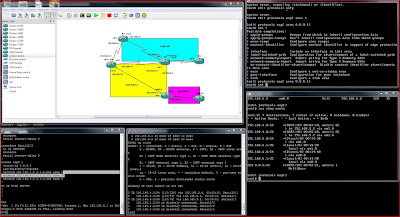
Added another Junos Router and am working with Stubs and NSSA's
https://learningportal.juniper.net/juniper/user_activity_info.aspx?id=3310
Added another Junos Router and am working with Stubs and NSSA's

Tuesday, January 10, 2012
Wireshark capture
Just a pic of wireshark running and capturing em1 on the Juniper. Only problem with this is that when you start the capture you have to reload the juniper. I wasn't sure if my config would remain. It did, but it takes forever to restart.


cisco - Juniper ospf configuration
It's coming along... Slowly
One of the things I've found is that in the Graphical representation, on the Junos routers, GNS3 doesn't apparently always label the ports correctly. em0/e0 isn't always on the correct side as it is represented in Dynamips.
But we have neighborship.

R2#sh ip ospf neighbor
Neighbor ID Pri State Dead Time Address Interface
1.1.1.1 128 FULL/BDR 00:00:39 192.168.6.1 Ethernet1/0
cisco:
R2(config)#do sh run | b int
interface Serial0/0
ip address 192.168.1.2 255.255.255.0
serial restart-delay 0
clock rate 64000
!
interface Serial0/1
ip address 192.168.3.2 255.255.255.0
serial restart-delay 0
!
interface Serial0/2
ip address 192.168.2.2 255.255.255.0
serial restart-delay 0
!
interface Serial0/3
no ip address
shutdown
serial restart-delay 0
!
interface Ethernet1/0
ip address 192.168.6.2 255.255.255.0
ip flow ingress
ip flow egress
ip ospf network broadcast
full-duplex
!
interface Ethernet1/1
no ip address
shutdown
half-duplex
!
interface Ethernet1/2
no ip address
shutdown
half-duplex
!
interface Ethernet1/3
no ip address
shutdown
half-duplex
!
router eigrp 100
network 192.168.1.0
network 192.168.2.0
auto-summary
!
router ospf 1
router-id 6.6.6.6
log-adjacency-changes
network 192.168.6.0 0.0.0.255 area 0
Juniper config


One of the things I've found is that in the Graphical representation, on the Junos routers, GNS3 doesn't apparently always label the ports correctly. em0/e0 isn't always on the correct side as it is represented in Dynamips.
But we have neighborship.

R2#sh ip ospf neighbor
Neighbor ID Pri State Dead Time Address Interface
1.1.1.1 128 FULL/BDR 00:00:39 192.168.6.1 Ethernet1/0
cisco:
R2(config)#do sh run | b int
interface Serial0/0
ip address 192.168.1.2 255.255.255.0
serial restart-delay 0
clock rate 64000
!
interface Serial0/1
ip address 192.168.3.2 255.255.255.0
serial restart-delay 0
!
interface Serial0/2
ip address 192.168.2.2 255.255.255.0
serial restart-delay 0
!
interface Serial0/3
no ip address
shutdown
serial restart-delay 0
!
interface Ethernet1/0
ip address 192.168.6.2 255.255.255.0
ip flow ingress
ip flow egress
ip ospf network broadcast
full-duplex
!
interface Ethernet1/1
no ip address
shutdown
half-duplex
!
interface Ethernet1/2
no ip address
shutdown
half-duplex
!
interface Ethernet1/3
no ip address
shutdown
half-duplex
!
router eigrp 100
network 192.168.1.0
network 192.168.2.0
auto-summary
!
router ospf 1
router-id 6.6.6.6
log-adjacency-changes
network 192.168.6.0 0.0.0.255 area 0
Juniper config


Tuesday, January 3, 2012


Friday, December 30, 2011
2012 WILL BE HUGE !
After taking 2011 pretty much off, It's back to the rat races again, both literally and figuratively.
2012 New Years Resolutions
1. get my CCNP and/or CCIP and move into an Engineering slot at the end of the year or early next.
2. Lose 20 lbs, both for my joints as I age, and for 20lbs less in the autocross car. I carry 200lbs ok, but I'd like to get into a 34inch waist from my tight 36 now. I'll wait to buy a race seat until I accomplish this... ;-)
3. Make it to all the races I plan to.
4. Get us fully financially healthy so that more can go into the college funds starting 2013
5. Win at least one trophy in STX at a national level race.
6. Win STX locally at both SPOKES and SASCA.
2012 New Years Resolutions
1. get my CCNP and/or CCIP and move into an Engineering slot at the end of the year or early next.
2. Lose 20 lbs, both for my joints as I age, and for 20lbs less in the autocross car. I carry 200lbs ok, but I'd like to get into a 34inch waist from my tight 36 now. I'll wait to buy a race seat until I accomplish this... ;-)
3. Make it to all the races I plan to.
4. Get us fully financially healthy so that more can go into the college funds starting 2013
5. Win at least one trophy in STX at a national level race.
6. Win STX locally at both SPOKES and SASCA.
Tuesday, December 6, 2011
Moving on to OSPF
Another lil' break but getting charged up to push on. Working OSPF sims and some reading.
Wednesday, November 2, 2011
Just found this. It may be new. I may acually pop for a 6 month subscription. Only $109.00
On the Cisco Learning Network Store
Cisco CCNP 6 month subscription to digital content
Includes all this:
On the Cisco Learning Network Store
Cisco CCNP 6 month subscription to digital content
Includes all this:
- CCNP Route Cert Guide
- Route Foundation Learning Guide
- Routing Video Mentor
- CCNP Route Quick Reference
- CCNP Route Portable Command Guide
- CCNP Switch Cert Guide
- Switch Foundation Learning Guide
- Cisco LAN Switching Video Mentor
- CCNP SwitchQuick Reference
- CCNP Switch Portable Command Guide
- CCNP TSHOOT Cert Guide
- CCNP TSHOOT Foundation Learning Guide
- Network Troubleshooting Video Mentor
- CCNP TSHOOT Quick Reference
- CCNP Quick Reference
Subscribe to:
Posts (Atom)