Anyone following might have noticed that there have been no posts lately.
I've taken a break from certs, and even sold the lab to someone I work with. Back to Racing SCCA Solo (Auto-cross) for the next year or so. My car (08' subaru WRX) will likely be re-classed to a class that it can actually be competitive in, and things are jumpin' at work. Since we are switching over to a mainly Alcatel 77xx platform, and What Cisco Transport we utilize, doesn't really utilize IOS as a front end, I don't really need the CCNP right now. When I feel I'm ready to move into engineering, I'll likely pick this back up, but not until I finish the first level Alcatel, and Juniper Certifications.
Good luck to all, and I hope what I have here is useful.

a network engineering education Illustrated
Sunday, July 17, 2011


Monday, May 23, 2011
Re-posting configs from the labs
As I am going through the CBT Nuggets labs again, I'll be posting the more-correct configs now that I know what "behind the scenes" configurations were set up on the routers prior to starting the labs.
My knowledge was limited the first time through these labs, so now I know how they were set up to produce the expected results.
Just finished the first two EIGRP labs.
My knowledge was limited the first time through these labs, so now I know how they were set up to produce the expected results.
Just finished the first two EIGRP labs.
Saturday, May 14, 2011
Network Closet Redesign
Got home from work today and decided to clean up the closet and get things more accessible for starting Switch.
The Before:

And the After, courtesy of Ikea:

Added a TFTP server, Monitor, keyboard and a touchpad.
I used the Kill-a-watt to check power consumption again.
With the 3550, and 2509 fired up, the meter read about 98 watts, as I added each router, it went up about 15 watts per router through the first three 2620 XM's. The 2650's were about 30-40 watts a piece and the last 2621 xm was 20watts. All told, I was at 200 watts with 7 routers and a switch powered up.
Adding the Dell optiplex and an old crt monitor added another 100watts. So, at 300 watt's, I'll definitely be saving my configs, and powering it down when it's not in use now. Left on 24hours a day, that works out to close to $20 a month, which would be about 20% of our electric bill now, and we're getting close to the months here in Southeast Texas in which our bill for a fairly small house (almost 2000 square feet) can run up to $300 a month.
Something to consider...
The Before:

And the After, courtesy of Ikea:

Added a TFTP server, Monitor, keyboard and a touchpad.
I used the Kill-a-watt to check power consumption again.
With the 3550, and 2509 fired up, the meter read about 98 watts, as I added each router, it went up about 15 watts per router through the first three 2620 XM's. The 2650's were about 30-40 watts a piece and the last 2621 xm was 20watts. All told, I was at 200 watts with 7 routers and a switch powered up.
Adding the Dell optiplex and an old crt monitor added another 100watts. So, at 300 watt's, I'll definitely be saving my configs, and powering it down when it's not in use now. Left on 24hours a day, that works out to close to $20 a month, which would be about 20% of our electric bill now, and we're getting close to the months here in Southeast Texas in which our bill for a fairly small house (almost 2000 square feet) can run up to $300 a month.
Something to consider...
Tuesday, May 10, 2011
The Linux Love affair continues
Now having discovered Wine, (I always knew about it, but had not ever tried it in previous forays into linux) 1.3, I now have visual CertExam, and Kindle for PC up and running.
Viva' no Microsoft !!!

Viva' no Microsoft !!!

Thursday, April 28, 2011
Posts will probably be fewer and farther between for a few weeks
Should be testing for Route in a few weeks, so now I'll mainly be running through test questions while reading through the Cisco press Route book again (on Kindle for Android, the one crappy thing about not having a windows machine now.)
I'll get the configs posted for the last BGP lab here as well. Someone asked about it. Jeremy with CBT doesn't have his included either, so I'm sure people look for them.
I'll get the configs posted for the last BGP lab here as well. Someone asked about it. Jeremy with CBT doesn't have his included either, so I'm sure people look for them.
Monday, April 18, 2011
Policy Based Routing
After using most of my study time last night trying to figure out why my lab wasn't working in GNS3, then building it in my live lab...
When Simulating hosts using routers, REMEMBER TO TURN IP ROUTING OFF !!!
duh.
Anyway:


Gotta Luv Working in Linux now.
once you figure something out, you realize how much better it works in Linux.
ISP1
r1#sh run
Building configuration...
Current configuration : 1012 bytes
!
version 12.4
service timestamps debug datetime msec
service timestamps log datetime msec
no service password-encryption
!
hostname r1
!
boot-start-marker
boot-end-marker
!
!
no aaa new-model
!
resource policy
!
no network-clock-participate slot 1
no network-clock-participate wic 0
ip cef
!
!
!
!
no ip domain lookup
!
!
!
!
!
!
!
!
!
!
!
!
!
!
!
!
!
!
!
!
!
!
!
interface FastEthernet0/0
no ip address
shutdown
duplex auto
speed auto
!
interface Serial0/0
ip address 10.1.12.2 255.255.255.0
shutdown
no fair-queue
no dce-terminal-timing-enable
service-module t1 clock source internal
service-module t1 timeslots 1-24
!
interface Serial0/1
ip address 200.1.1.2 255.255.255.0
ip access-group log in
no dce-terminal-timing-enable
!
ip route 192.168.1.0 255.255.255.0 200.1.1.1
!
!
ip http server
no ip http secure-server
!
!
!
!
control-plane
!
!
!
!
!
!
!
!
!
!
line con 0
exec-timeout 600 0
logging synchronous
login
line aux 0
line vty 0
password cisco
login
line vty 1 4
login
!
!
end
ISP 2
r2#
r2#sh run
Building configuration...
Current configuration : 927 bytes
!
version 12.4
service timestamps debug datetime msec
service timestamps log datetime msec
no service password-encryption
!
hostname r2
!
boot-start-marker
boot-end-marker
!
!
no aaa new-model
!
resource policy
!
no ip routing
no ip cef
!
!
!
!
no ip domain lookup
!
!
!
!
!
!
!
!
!
!
!
!
!
!
!
!
!
!
!
!
!
!
!
interface FastEthernet0/0
no ip address
no ip route-cache
shutdown
duplex auto
speed auto
!
interface Serial0/0
ip address 10.1.13.2 255.255.255.0
no ip route-cache
shutdown
no fair-queue
no dce-terminal-timing-enable
service-module t1 timeslots 1-24
!
interface Serial0/1
ip address 201.1.1.2 255.255.255.0
ip access-group log in
no ip route-cache
no fair-queue
no dce-terminal-timing-enable
!
!
!
ip http server
no ip http secure-server
!
!
!
!
control-plane
!
!
!
!
!
!
!
!
!
!
line con 0
exec-timeout 600 0
password bazilboo
logging synchronous
login
line aux 0
line vty 0 4
login
!
!
end
Policy Router
FR3#sh run
Building configuration...
Current configuration : 1981 bytes
!
version 12.4
service timestamps debug datetime msec
service timestamps log datetime msec
service password-encryption
!
hostname FR3
!
boot-start-marker
boot-end-marker
!
!
no aaa new-model
!
resource policy
!
no network-clock-participate slot 1
no network-clock-participate wic 0
ip cef
!
!
!
!
no ip domain lookup
!
!
!
!
!
!
!
!
!
!
!
!
!
!
!
!
!
!
!
!
!
!
!
interface FastEthernet0/0
ip address 192.168.1.1 255.255.255.0
ip policy route-map POLICY
duplex auto
speed auto
!
interface Serial0/0
no ip address
shutdown
no fair-queue
no dce-terminal-timing-enable
!
interface Serial1/0
ip address 200.1.1.1 255.255.255.0
clock rate 64000
no dce-terminal-timing-enable
!
interface Serial1/1
ip address 201.1.1.1 255.255.255.0
clock rate 64000
dce-terminal-timing-enable
!
interface Serial1/2
ip address 10.1.45.1 255.255.255.0
shutdown
clock rate 64000
no dce-terminal-timing-enable
!
interface Serial1/3
description link to AS(R5 s/0)
no ip address
logging event subif-link-status
no dce-terminal-timing-enable
!
interface Serial1/4
no ip address
logging event subif-link-status
clock rate 64000
dce-terminal-timing-enable
!
interface Serial1/5
no ip address
shutdown
no dce-terminal-timing-enable
!
interface Serial1/6
no ip address
shutdown
no dce-terminal-timing-enable
!
interface Serial1/7
no ip address
shutdown
no dce-terminal-timing-enable
!
!
!
ip http server
no ip http secure-server
!
ip access-list extended CLIENT1
permit ip host 192.168.1.20 any
ip access-list extended CLIENT2
permit tcp host 192.168.1.21 any eq telnet
permit tcp host 192.168.1.21 any eq 443
!
!
route-map POLICY permit 10
match ip address CLIENT1
set ip next-hop 201.1.1.2
!
route-map POLICY permit 20
match ip address CLIENT2
set ip next-hop 200.1.1.2
!
route-map POLICY permit 30
set ip next-hop 201.1.1.2
!
!
!
control-plane
!
!
!
!
!
!
!
!
!
!
line con 0
exec-timeout 600 0
password 7 0111071E520704002E
logging synchronous
login
line aux 0
line vty 0 4
login
!
!
end
Client 1
r4#sh run
Building configuration...
Current configuration : 939 bytes
!
version 12.2
service timestamps debug datetime msec
service timestamps log datetime msec
service password-encryption
!
hostname r4
!
!
no ip subnet-zero
no ip routing
!
!
!
!
!
voice call carrier capacity active
!
!
!
!
!
!
!
!
!
mta receive maximum-recipients 0
!
!
!
!
interface FastEthernet0/0
ip address 192.168.1.20 255.255.255.0
no ip route-cache
no ip mroute-cache
duplex auto
speed auto
!
interface Serial0/0
no ip address
no ip route-cache
shutdown
no fair-queue
service-module t1 clock source internal
service-module t1 timeslots 1-24
!
interface Serial0/1
no ip address
no ip route-cache
shutdown
service-module t1 clock source internal
service-module t1 timeslots 1-24
!
ip default-gateway 192.168.1.1
ip classless
no ip http server
!
!
!
call rsvp-sync
!
!
mgcp profile default
!
dial-peer cor custom
!
!
!
!
line con 0
exec-timeout 600 0
logging synchronous
login
line aux 0
line vty 0 4
login
!
!
end
When Simulating hosts using routers, REMEMBER TO TURN IP ROUTING OFF !!!
duh.
Anyway:


Gotta Luv Working in Linux now.
once you figure something out, you realize how much better it works in Linux.
ISP1
r1#sh run
Building configuration...
Current configuration : 1012 bytes
!
version 12.4
service timestamps debug datetime msec
service timestamps log datetime msec
no service password-encryption
!
hostname r1
!
boot-start-marker
boot-end-marker
!
!
no aaa new-model
!
resource policy
!
no network-clock-participate slot 1
no network-clock-participate wic 0
ip cef
!
!
!
!
no ip domain lookup
!
!
!
!
!
!
!
!
!
!
!
!
!
!
!
!
!
!
!
!
!
!
!
interface FastEthernet0/0
no ip address
shutdown
duplex auto
speed auto
!
interface Serial0/0
ip address 10.1.12.2 255.255.255.0
shutdown
no fair-queue
no dce-terminal-timing-enable
service-module t1 clock source internal
service-module t1 timeslots 1-24
!
interface Serial0/1
ip address 200.1.1.2 255.255.255.0
ip access-group log in
no dce-terminal-timing-enable
!
ip route 192.168.1.0 255.255.255.0 200.1.1.1
!
!
ip http server
no ip http secure-server
!
!
!
!
control-plane
!
!
!
!
!
!
!
!
!
!
line con 0
exec-timeout 600 0
logging synchronous
login
line aux 0
line vty 0
password cisco
login
line vty 1 4
login
!
!
end
ISP 2
r2#
r2#sh run
Building configuration...
Current configuration : 927 bytes
!
version 12.4
service timestamps debug datetime msec
service timestamps log datetime msec
no service password-encryption
!
hostname r2
!
boot-start-marker
boot-end-marker
!
!
no aaa new-model
!
resource policy
!
no ip routing
no ip cef
!
!
!
!
no ip domain lookup
!
!
!
!
!
!
!
!
!
!
!
!
!
!
!
!
!
!
!
!
!
!
!
interface FastEthernet0/0
no ip address
no ip route-cache
shutdown
duplex auto
speed auto
!
interface Serial0/0
ip address 10.1.13.2 255.255.255.0
no ip route-cache
shutdown
no fair-queue
no dce-terminal-timing-enable
service-module t1 timeslots 1-24
!
interface Serial0/1
ip address 201.1.1.2 255.255.255.0
ip access-group log in
no ip route-cache
no fair-queue
no dce-terminal-timing-enable
!
!
!
ip http server
no ip http secure-server
!
!
!
!
control-plane
!
!
!
!
!
!
!
!
!
!
line con 0
exec-timeout 600 0
password bazilboo
logging synchronous
login
line aux 0
line vty 0 4
login
!
!
end
Policy Router
FR3#sh run
Building configuration...
Current configuration : 1981 bytes
!
version 12.4
service timestamps debug datetime msec
service timestamps log datetime msec
service password-encryption
!
hostname FR3
!
boot-start-marker
boot-end-marker
!
!
no aaa new-model
!
resource policy
!
no network-clock-participate slot 1
no network-clock-participate wic 0
ip cef
!
!
!
!
no ip domain lookup
!
!
!
!
!
!
!
!
!
!
!
!
!
!
!
!
!
!
!
!
!
!
!
interface FastEthernet0/0
ip address 192.168.1.1 255.255.255.0
ip policy route-map POLICY
duplex auto
speed auto
!
interface Serial0/0
no ip address
shutdown
no fair-queue
no dce-terminal-timing-enable
!
interface Serial1/0
ip address 200.1.1.1 255.255.255.0
clock rate 64000
no dce-terminal-timing-enable
!
interface Serial1/1
ip address 201.1.1.1 255.255.255.0
clock rate 64000
dce-terminal-timing-enable
!
interface Serial1/2
ip address 10.1.45.1 255.255.255.0
shutdown
clock rate 64000
no dce-terminal-timing-enable
!
interface Serial1/3
description link to AS(R5 s/0)
no ip address
logging event subif-link-status
no dce-terminal-timing-enable
!
interface Serial1/4
no ip address
logging event subif-link-status
clock rate 64000
dce-terminal-timing-enable
!
interface Serial1/5
no ip address
shutdown
no dce-terminal-timing-enable
!
interface Serial1/6
no ip address
shutdown
no dce-terminal-timing-enable
!
interface Serial1/7
no ip address
shutdown
no dce-terminal-timing-enable
!
!
!
ip http server
no ip http secure-server
!
ip access-list extended CLIENT1
permit ip host 192.168.1.20 any
ip access-list extended CLIENT2
permit tcp host 192.168.1.21 any eq telnet
permit tcp host 192.168.1.21 any eq 443
!
!
route-map POLICY permit 10
match ip address CLIENT1
set ip next-hop 201.1.1.2
!
route-map POLICY permit 20
match ip address CLIENT2
set ip next-hop 200.1.1.2
!
route-map POLICY permit 30
set ip next-hop 201.1.1.2
!
!
!
control-plane
!
!
!
!
!
!
!
!
!
!
line con 0
exec-timeout 600 0
password 7 0111071E520704002E
logging synchronous
login
line aux 0
line vty 0 4
login
!
!
end
Client 1
r4#sh run
Building configuration...
Current configuration : 939 bytes
!
version 12.2
service timestamps debug datetime msec
service timestamps log datetime msec
service password-encryption
!
hostname r4
!
!
no ip subnet-zero
no ip routing
!
!
!
!
!
voice call carrier capacity active
!
!
!
!
!
!
!
!
!
mta receive maximum-recipients 0
!
!
!
!
interface FastEthernet0/0
ip address 192.168.1.20 255.255.255.0
no ip route-cache
no ip mroute-cache
duplex auto
speed auto
!
interface Serial0/0
no ip address
no ip route-cache
shutdown
no fair-queue
service-module t1 clock source internal
service-module t1 timeslots 1-24
!
interface Serial0/1
no ip address
no ip route-cache
shutdown
service-module t1 clock source internal
service-module t1 timeslots 1-24
!
ip default-gateway 192.168.1.1
ip classless
no ip http server
!
!
!
call rsvp-sync
!
!
mgcp profile default
!
dial-peer cor custom
!
!
!
!
line con 0
exec-timeout 600 0
logging synchronous
login
line aux 0
line vty 0 4
login
!
!
end
Client 2
Current configuration : 1102 bytes
!
version 12.4
service timestamps debug datetime msec
service timestamps log datetime msec
service password-encryption
!
hostname r5
!
boot-start-marker
boot-end-marker
!
!
no aaa new-model
!
resource policy
!
no network-clock-participate slot 1
no network-clock-participate wic 0
no ip subnet-zero
no ip routing
!
!
no ip dhcp use vrf connected
!
!
no ip cef
no ip domain lookup
no ip ips deny-action ips-interface
!
!
!
!
!
!
!
!
!
!
!
!
!
!
!
!
!
!
!
!
!
interface FastEthernet0/0
ip address 192.168.1.21 255.255.255.0
no ip route-cache
duplex auto
speed auto
!
interface Serial0/0
no ip address
no ip route-cache
ip ospf network point-to-point
shutdown
no dce-terminal-timing-enable
service-module t1 clock source internal
service-module t1 timeslots 1-24
!
interface Serial0/1
no ip address
no ip route-cache
shutdown
no dce-terminal-timing-enable
!
ip default-gateway 192.168.1.1
ip classless
!
!
ip http server
no ip http secure-server
!
!
!
!
control-plane
!
!
!
!
!
!
!
!
!
!
line con 0
exec-timeout 600 0
logging synchronous
login
line aux 0
line vty 0 4
login
!
!
end
On to IPV6...
Wednesday, April 13, 2011
FREE, FREE, FREE at last!
Finally broke out of the Microsoft Prison.
Reformatted my entire system to Ubuntu, instead of the Dual boot.
Found Putty, GNS3, before deciding to do this and now afterwards, was actually able to install my USB/Serial Converter after only learning a few short commands.
If you have one and you want to use linux remember these commands:
sudo apt-get install cu
get's the callup program installed.
sudo dmesg
get's the device listings to make sure your device has installed correctly. Mine is based on the Prolific PL2303 chipset, and basically installed itself.
sudo cu -l /dev/ttyUSB0 -s 9600
Connects at the proper com port speed
It just amazes me. I absolutely caught hell trying to get this thing installed in Win7, and it only worked intermittently.
I'm missing Mr. Gates company less and less by the second.
Reformatted my entire system to Ubuntu, instead of the Dual boot.
Found Putty, GNS3, before deciding to do this and now afterwards, was actually able to install my USB/Serial Converter after only learning a few short commands.
If you have one and you want to use linux remember these commands:
sudo apt-get install cu
get's the callup program installed.
sudo dmesg
get's the device listings to make sure your device has installed correctly. Mine is based on the Prolific PL2303 chipset, and basically installed itself.
sudo cu -l /dev/ttyUSB0 -s 9600
Connects at the proper com port speed
It just amazes me. I absolutely caught hell trying to get this thing installed in Win7, and it only worked intermittently.
I'm missing Mr. Gates company less and less by the second.
Monday, April 11, 2011
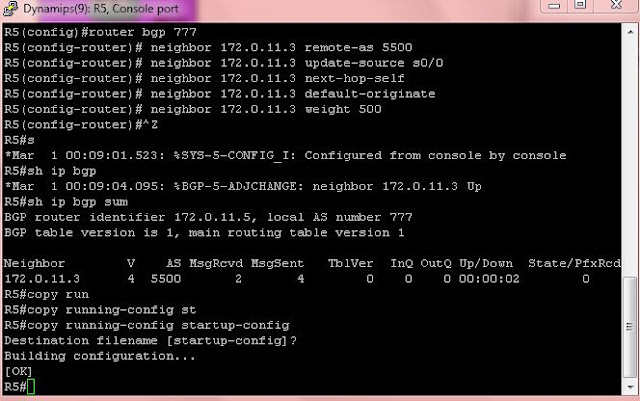
BGP LAB 3 with the CBT Nuggs w/GNS3
Working one of the BGP tuning attributes videos now. Doing it in GNS3 since I have it up and working pretty well now. I was going to be a cable short to do this on the home lab anyway.


Sunday, April 10, 2011
GNS3 Pointers for beginners like me
Finally, after building a decent little home network, I get enough GNS3 knowledge, and correct IOS that run well over it.
Anyway, for the beginner here is my walkthrough on basic setup and the key config issues that you may run into.
Start here to find your downloads, forums, etc:
http://www.gns3.net/
and here is a beginners Tutorial if what I have put out here isn't enough, it's more in depth, and a true beginner can get lost at times. Don't ask me how I know:
http://iweb.dl.sourceforge.net/project/gns-3/GNS3/0.5/GNS3-0.5-tutorial.pdf
and there are many more tutorials here for specific topics:
http://www.gns3.net/documentation
There is a download page there where you can get an all-in-one, or Dynamips only if that is all your system is powerful enough to run.
Hint: If you have the ability to do so, run GNS3 on Linux, as it runs much better with less resources.
System requirements :
This is a shady area. All I can say is my Core2Duo Win7, 2ghz, 4gb ram, precision workstation laptop runs 7 3640 routers running BGP and OSPF with ios c3640-i-mz.124-12(22mb, unpacked), with no problem. My 1.6ghz tablet pc with Win7, 4gb ram, had trouble with 4-5 routers. This is highly CPU intensive, so regardless of the system, you will have to fiddle with the idle pc value every now and then to keep the CPU from maxing out.
IOS:
2600 IOS, do not work well with GNS3, and for them to work at all, they need to be unpacked. I believe I read that all IOS will work better with GNS3 if unpacked.
unpacking an IOS is most easily done with WinRAR.
Setup
Preferences are under the Edit menu, here are mine:




Anyway, for the beginner here is my walkthrough on basic setup and the key config issues that you may run into.
Start here to find your downloads, forums, etc:
http://www.gns3.net/
and here is a beginners Tutorial if what I have put out here isn't enough, it's more in depth, and a true beginner can get lost at times. Don't ask me how I know:
http://iweb.dl.sourceforge.net/project/gns-3/GNS3/0.5/GNS3-0.5-tutorial.pdf
and there are many more tutorials here for specific topics:
http://www.gns3.net/documentation
There is a download page there where you can get an all-in-one, or Dynamips only if that is all your system is powerful enough to run.
Hint: If you have the ability to do so, run GNS3 on Linux, as it runs much better with less resources.
System requirements :
This is a shady area. All I can say is my Core2Duo Win7, 2ghz, 4gb ram, precision workstation laptop runs 7 3640 routers running BGP and OSPF with ios c3640-i-mz.124-12(22mb, unpacked), with no problem. My 1.6ghz tablet pc with Win7, 4gb ram, had trouble with 4-5 routers. This is highly CPU intensive, so regardless of the system, you will have to fiddle with the idle pc value every now and then to keep the CPU from maxing out.
IOS:
2600 IOS, do not work well with GNS3, and for them to work at all, they need to be unpacked. I believe I read that all IOS will work better with GNS3 if unpacked.
unpacking an IOS is most easily done with WinRAR.
Setup
Preferences are under the Edit menu, here are mine:

I changed the waiting time between starting every device as it helps to keep the system from overloading the CPU sometimes...I also changed the autosave time to 600 secs(15mins) as the default is 2 seconds, which I think also loads the CPU. The rest of the pics are just for reference, as I left everything else at the default setting, except for changing memory that each Hypervisor can use, which I increased from 512 to 1024mb


IOS images and Hypervisors is also under the Edit menu.
This is where you show the program the path to the IOS that you must have to run the program. As you can see, I have both my packed and unpacked versions of my 3600 IOS. The highlighted area is the button you push to get the path choice popup to choose the path to where your IOS is. I stored mine in my docs folder. I did in a previous attempt, put it somewhere it didn't like and couldn't get it started.
You need to choose min ram for the sim to start the router out with. You can also choose a base config as well, set up as a text file.I haven't tried this. Once you have the path selected, ram configged, you will have to save the setting.

Once you get that set up, you are ready to go!
The far left window includes the routers that are available if you have the appropriate IOS, and some gns3 specific devices, like the eth switch, frame relay switch, etc. You will only be able to place named routers into your network that you have installed IOS for. For those that you do, just drag and drop. After you get what you want in the network window(center) you need to right click on each router to configure it (choose configure, ;-). This will bring up a window that will let you change the types of modules installed, and memory config.

This will get you this popup. Click the router name, it will open the choices at the right. I only configure the Slots. I've been leaving everything else default.

Once the routers are configged, you can add your physical links. Use this button at the top of the menu bar:

The link button will give you a menu with link choices, or Manual. Manual will give you a popup when you select a device and show all available interfaces. This sim does not simulate physical layer, so you will not have to set DCE/DTE to make the interface work. There may be other settings that don't need to be set as well, while still allowing the link to work. You should be aware of this, as you may miss things and still have things work. I need to do a bit more research on this myself.
Once the desired interface type is chosen, just left click on the device you want to start from, and then right click on the destination device. That's it.
Now you have to configure the Fabled IDLE PC Value. This is what will make this thing work, unless you are running it on a 16 core 3.0ghz machine.
First things first. When you first config your routers and links your network will look like this:

Note that the ends of the links are all red, and the router names to the right are also in red. This is because you need to startup your devices. To do this, you can right click each individual device and choose startup in the menu, or start all at once from the menu bar with this button:

Starting them all up can be a CPU killer, which is why we chose the 3-5 seconds between starting devices in the initial configuration settings earlier.
Once they are all running, you will need to startup the consoles. Believe it or not, this is still getting to setting the Idle PC value. To start up the consoles, you can also then right click on the device and choose console in the dropdown menu, or go to the menu bar once again and choose this button:

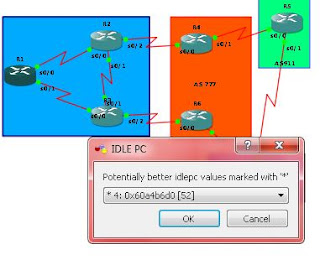
Once your consoles are up, you should take each router to enable, and then choose one router, right click on it, and then choose IDLE PC in the menu. This will bring up a popup like this while calculating:

Then another window when the calculations are complete. In this window the pulldown menu should have 10 choices or so. One of the choices should have (but doesn't always) have an asterisk next to it. That is the selection you should choose, as I guess it is optimal.

Before:

After

Notice the CPU usage drop.
Once you have accomplished this, you are pretty much ready to go and configure. You may have to repeat the idle pc process from choosing the router to calculate it on several times, or choose different routers to finally get the setting with the asterisk. It generally hasn't worked for me unless the asterisk is attached to the setting I choose.
Once you are done working, here is how to save your project as far as I know so far(it's working for me):
- First, save all your configs to startup-config like you would with a live router.
- Then stop all the routers with the red square in the menu bar. They appear to have to be stopped for GNS3 to access the startup config and export it to your saved file.
- Go into the file menu, choose "save project" which will give you this:

The directory is the default directory that was there when I started. In Win7 the AppData folder is hidden, so if you loose the path and have to find it, it's there, you just have to unhide the all folders in your user folder.
4. Choose your project name.
5. If you want to save the configs of the devices, check the two boxes. Thats it.
On the other hand, If you want to open a project you have created, use the open a project button that is grayed out in the pic. You can get to that from startup in the file menu, of course.
That will take you to an open folder window:

Choose your project folder and inside the folder choose the "topology" .net file with the GNS3 icon.

That will open the project with your routers in Stopped mode, start em' up and get crackin...
That really is the extent of my knowledge of GNS3 right now. For more specific info see the tutorials mentioned and linked earlier.
Hope this helps someone.
Tuesday, April 5, 2011
BGP LAB 2, advertising networks, Auto summary, Synchronization, and Next Hop addresses
Ahh, now into the meat of the stuff I at least monitor at work, BGP.
 A note of caution about these configs. I'm not 100% sure they are 100% correct. I keep going until I get the same results as in the Nugget's vids, but I'm sure there are commands that I may not have entirely correct. These configs result in the correct output of sh ip route, and sh ip bgp, so I'm pretty sure they are close.
Router 1 (labs router 2)
r1#sh run | b int
interface Loopback2
ip address 2.2.2.2 255.255.255.255
!
interface FastEthernet0/0
no ip address
shutdown
duplex auto
speed auto
!
interface Serial0/0
ip address 10.1.12.2 255.255.255.0
no fair-queue
no dce-terminal-timing-enable
service-module t1 clock source internal
service-module t1 timeslots 1-24
!
interface Serial0/1
ip address 10.1.24.1 255.255.255.0
no dce-terminal-timing-enable
!
router ospf 1
router-id 2.2.2.2
log-adjacency-changes
network 10.0.0.0 0.255.255.255 area 0
Router 2 (labs router 3)
r2#sh run | b int
interface Loopback3
ip address 3.3.3.3 255.255.255.255
!
interface FastEthernet0/0
no ip address
shutdown
duplex auto
speed auto
!
interface Serial0/0
ip address 10.1.13.2 255.255.255.0
no fair-queue
no dce-terminal-timing-enable
service-module t1 timeslots 1-24
!
interface Serial0/1
ip address 10.1.34.1 255.255.255.0
no fair-queue
no dce-terminal-timing-enable
!
router ospf 1
router-id 3.3.3.3
log-adjacency-changes
network 10.1.13.0 0.0.0.255 area 0
network 10.1.34.0 0.0.0.255 area 0
Router 3 (labs router 4)
interface Serial0/0
no ip address
shutdown
no fair-queue
no dce-terminal-timing-enable
!
interface Serial1/0
ip address 10.1.24.2 255.255.255.0
clock rate 64000
no dce-terminal-timing-enable
!
interface Serial1/1
ip address 10.1.34.2 255.255.255.0
clock rate 64000
dce-terminal-timing-enable
!
interface Serial1/2
ip address 10.1.45.1 255.255.255.0
clock rate 64000
no dce-terminal-timing-enable
!
interface Serial1/3
description link to AS(R5 s/0)
no ip address
logging event subif-link-status
no dce-terminal-timing-enable
!
interface Serial1/4
no ip address
logging event subif-link-status
clock rate 64000
dce-terminal-timing-enable
!
interface Serial1/5
no ip address
shutdown
no dce-terminal-timing-enable
!
interface Serial1/6
no ip address
shutdown
no dce-terminal-timing-enable
!
interface Serial1/7
no ip address
shutdown
no dce-terminal-timing-enable
!
router ospf 1
router-id 4.4.4.4
log-adjacency-changes
network 1.1.1.1 0.0.0.0 area 0
network 4.4.4.4 0.0.0.0 area 0
network 10.0.0.0 0.255.255.255 area 0
!
router bgp 5500
no synchronization
bgp log-neighbor-changes
neighbor 1.1.1.1 remote-as 5500
neighbor 1.1.1.1 update-source Loopback4
neighbor 1.1.1.1 next-hop-self
neighbor 10.1.45.2 remote-as 6500
no auto-summary
!
ip route 5.5.5.5 255.255.255.255 10.1.45.2
Router 4 (labs router 1)
interface Loopback0
ip address 1.1.1.1 255.255.255.255
!
interface FastEthernet0/0
no ip address
shutdown
duplex auto
speed auto
!
interface Serial0/0
ip address 10.1.13.1 255.255.255.0
no fair-queue
service-module t1 clock source internal
service-module t1 timeslots 1-24
!
interface Serial0/1
ip address 10.1.12.1 255.255.255.0
service-module t1 clock source internal
service-module t1 timeslots 1-24
!
router ospf 1
router-id 1.1.1.1
log-adjacency-changes
network 1.1.1.1 0.0.0.0 area 0
network 4.4.4.4 0.0.0.0 area 0
network 10.0.0.0 0.255.255.255 area 0
!
router bgp 5500
no synchronization
bgp log-neighbor-changes
neighbor 4.4.4.4 remote-as 5500
neighbor 4.4.4.4 update-source Loopback0
no auto-summary
Router 5 (Labs router 5)
interface Loopback0
ip address 200.1.1.1 255.255.255.0
!
interface Loopback1
ip address 200.1.2.1 255.255.255.0
!
interface Loopback2
ip address 200.1.3.1 255.255.255.0
!
interface Loopback3
ip address 200.1.4.1 255.255.255.0
!
interface Loopback4
ip address 200.1.5.1 255.255.255.0
!
interface Loopback5
ip address 200.1.6.1 255.255.255.0
!
interface Loopback6
ip address 50.1.1.1 255.255.255.0
!
interface FastEthernet0/0
ip address 192.168.0.186 255.255.255.0
shutdown
duplex auto
speed auto
!
interface Serial0/0
ip address 10.45.1.5 255.255.255.0
ip ospf network point-to-point
shutdown
no dce-terminal-timing-enable
service-module t1 clock source internal
service-module t1 timeslots 1-24
!
interface Serial0/1
ip address 10.1.45.2 255.255.255.0
no dce-terminal-timing-enable
!
router bgp 6500
no synchronization
bgp log-neighbor-changes
network 50.1.1.0 mask 255.255.255.0
redistribute connected route-map FILTER
neighbor 10.1.45.1 remote-as 5500
no auto-summary
!
ip classless
ip route 4.4.4.4 255.255.255.255 10.1.45.1
!
!
ip http server
no ip http secure-server
!
access-list 50 permit 200.1.1.0
access-list 50 permit 200.1.3.0
access-list 50 permit 200.1.2.0
access-list 50 permit 200.1.4.0
!
route-map FILTER permit 10
match ip address 50

Router 1 (labs router 2)
r1#sh run | b int
interface Loopback2
ip address 2.2.2.2 255.255.255.255
!
interface FastEthernet0/0
no ip address
shutdown
duplex auto
speed auto
!
interface Serial0/0
ip address 10.1.12.2 255.255.255.0
no fair-queue
no dce-terminal-timing-enable
service-module t1 clock source internal
service-module t1 timeslots 1-24
!
interface Serial0/1
ip address 10.1.24.1 255.255.255.0
no dce-terminal-timing-enable
!
router ospf 1
router-id 2.2.2.2
log-adjacency-changes
network 10.0.0.0 0.255.255.255 area 0
Router 2 (labs router 3)
r2#sh run | b int
interface Loopback3
ip address 3.3.3.3 255.255.255.255
!
interface FastEthernet0/0
no ip address
shutdown
duplex auto
speed auto
!
interface Serial0/0
ip address 10.1.13.2 255.255.255.0
no fair-queue
no dce-terminal-timing-enable
service-module t1 timeslots 1-24
!
interface Serial0/1
ip address 10.1.34.1 255.255.255.0
no fair-queue
no dce-terminal-timing-enable
!
router ospf 1
router-id 3.3.3.3
log-adjacency-changes
network 10.1.13.0 0.0.0.255 area 0
network 10.1.34.0 0.0.0.255 area 0
Router 3 (labs router 4)
interface Serial0/0
no ip address
shutdown
no fair-queue
no dce-terminal-timing-enable
!
interface Serial1/0
ip address 10.1.24.2 255.255.255.0
clock rate 64000
no dce-terminal-timing-enable
!
interface Serial1/1
ip address 10.1.34.2 255.255.255.0
clock rate 64000
dce-terminal-timing-enable
!
interface Serial1/2
ip address 10.1.45.1 255.255.255.0
clock rate 64000
no dce-terminal-timing-enable
!
interface Serial1/3
description link to AS(R5 s/0)
no ip address
logging event subif-link-status
no dce-terminal-timing-enable
!
interface Serial1/4
no ip address
logging event subif-link-status
clock rate 64000
dce-terminal-timing-enable
!
interface Serial1/5
no ip address
shutdown
no dce-terminal-timing-enable
!
interface Serial1/6
no ip address
shutdown
no dce-terminal-timing-enable
!
interface Serial1/7
no ip address
shutdown
no dce-terminal-timing-enable
!
router ospf 1
router-id 4.4.4.4
log-adjacency-changes
network 1.1.1.1 0.0.0.0 area 0
network 4.4.4.4 0.0.0.0 area 0
network 10.0.0.0 0.255.255.255 area 0
!
router bgp 5500
no synchronization
bgp log-neighbor-changes
neighbor 1.1.1.1 remote-as 5500
neighbor 1.1.1.1 update-source Loopback4
neighbor 1.1.1.1 next-hop-self
neighbor 10.1.45.2 remote-as 6500
no auto-summary
!
ip route 5.5.5.5 255.255.255.255 10.1.45.2
Router 4 (labs router 1)
interface Loopback0
ip address 1.1.1.1 255.255.255.255
!
interface FastEthernet0/0
no ip address
shutdown
duplex auto
speed auto
!
interface Serial0/0
ip address 10.1.13.1 255.255.255.0
no fair-queue
service-module t1 clock source internal
service-module t1 timeslots 1-24
!
interface Serial0/1
ip address 10.1.12.1 255.255.255.0
service-module t1 clock source internal
service-module t1 timeslots 1-24
!
router ospf 1
router-id 1.1.1.1
log-adjacency-changes
network 1.1.1.1 0.0.0.0 area 0
network 4.4.4.4 0.0.0.0 area 0
network 10.0.0.0 0.255.255.255 area 0
!
router bgp 5500
no synchronization
bgp log-neighbor-changes
neighbor 4.4.4.4 remote-as 5500
neighbor 4.4.4.4 update-source Loopback0
no auto-summary
Router 5 (Labs router 5)
interface Loopback0
ip address 200.1.1.1 255.255.255.0
!
interface Loopback1
ip address 200.1.2.1 255.255.255.0
!
interface Loopback2
ip address 200.1.3.1 255.255.255.0
!
interface Loopback3
ip address 200.1.4.1 255.255.255.0
!
interface Loopback4
ip address 200.1.5.1 255.255.255.0
!
interface Loopback5
ip address 200.1.6.1 255.255.255.0
!
interface Loopback6
ip address 50.1.1.1 255.255.255.0
!
interface FastEthernet0/0
ip address 192.168.0.186 255.255.255.0
shutdown
duplex auto
speed auto
!
interface Serial0/0
ip address 10.45.1.5 255.255.255.0
ip ospf network point-to-point
shutdown
no dce-terminal-timing-enable
service-module t1 clock source internal
service-module t1 timeslots 1-24
!
interface Serial0/1
ip address 10.1.45.2 255.255.255.0
no dce-terminal-timing-enable
!
router bgp 6500
no synchronization
bgp log-neighbor-changes
network 50.1.1.0 mask 255.255.255.0
redistribute connected route-map FILTER
neighbor 10.1.45.1 remote-as 5500
no auto-summary
!
ip classless
ip route 4.4.4.4 255.255.255.255 10.1.45.1
!
!
ip http server
no ip http secure-server
!
access-list 50 permit 200.1.1.0
access-list 50 permit 200.1.3.0
access-list 50 permit 200.1.2.0
access-list 50 permit 200.1.4.0
!
route-map FILTER permit 10
match ip address 50
Subscribe to:
Posts (Atom)