Tuesday, April 16, 2013


Still working on SWITCH, but I am also concurrently taking an online course on Programming fundamentals, on the www.coursera.org online course catalog. If you haven't checked it out, there are amazing courses available, and it's one of the reasons I want to press to finish the CCNP, so that I can enroll in more.

I am taking:

The Hardware/Software Interface 
by Luis Ceze, Gaetano Borriello

These professors are from the University of Washington Computer engineering school, and should be a good re-introduction into machine code, assembly language and compilers, to get a more basic grasp on coding and scripting and communicating to micro-controllers which, if you have checked out my robotics blog, is something that I am gaining interest in, if for nothing else, but to pass on to my kids.

It is also a refresher into utilizing VMware with linux, in this case, Red Hat Fedora over VMware.

I used VMware once before to make GNS3 run on a Win8 machine when Win8 was still in the TechNet beta, and the installer would not recognize it as a valid OS.

Anyway, this is what our instance looks like:


Thursday, March 14, 2013

Cisco Switch online Labs first impressions

I'm about to start the "new hire" lab in the Cisco learning Store simulated switching labs.

I purchased the 25 hour block for $75 usd.

first impressions using the lab.

1. Doesn't appear to work in Chrome on a Mac unless I need to turn pop-up blocker off or something.
2. initial log-in works in Safari, on a Mac.
3. There is a silly double log-in process in which you  have to enter your username and password that you get from the e-mail from Cisco on two separate screens.
4. At lab start it states "Click Help before your lab time begins to answer any questions about the lab without using your time." The "Help" word in that statement is colored differently as if it should be clickable, but it isn't, so I'm not sure what help function they are referring to.

I don't know why Cisco seems to have so much trouble with HTML development. They REALLY struggled with the Cisco Learning network and managing passwords between Cisco.com, and the CLN. It took them years to sort that into something useful. Processing RMA's on Cisco.com was also just as difficult, but it's better now.

Diving into the Lab now.


I'd suggest printing out the Objectives pages, and the Job Aids, and the final Configs. I'm putting them all in a loose leaf folder. It will save time moving window to window.

As far as I can tell, logging into a device is just like in GNS3, I haven't implemented a lab yet, so I'll have to reserve my judgement on the functionality.

looks like it will work and one should be able to configure the devices as you choose if you want to make your own lab as long as it can use the topology in use.

Here are the labs available:


Monday, March 4, 2013

Passed ROUTE !

Well, it's a done deal...

Passed the CCNP Route test with a score over 900. I think it probably should have been around 30 points higher, but I don't think one of the labs was working correctly.

On to switch. I'm not sure if I'll be picking up any live lab equipment for this. I had thought about a 3550 or 3560 or two run through GNS3, but I may pay for rack time from Cisco.

About two vids into the CBT's for SWITCH already.


Friday, February 8, 2013

Blog just went over 20,000 hits !

Well, went over 20,000 hits this week so, hopefully it's been helpful for some.

If anything it's a cautionary tale of procrastination. My taking my time with this is only one part procrastination, mixed with going with the flow of Work over-time opportunities and the very full race schedule I had last year, for at least half the year.

Last year was supposed to be the taking racing serious year, cut a bit short by just about every appliance in our house going out, killing the meager racing budget. We've been working hard enough catching up financially that I didn't want to risk $200 on a test unless I feel like I'm totally ready, and honestly, truly need to. My overall goal is to be done with the CCNP and be in an engineering position by 2015, so I think I can accomplish this.

I'll hopefully be in position to take the CCIE written by 2020. In the industry I'm in, I'm not sure I will get the day to day experience on the job to ever be ready for the CCIE practical, or really and truly, to ever need it. We'll see.

It's always good to have long term goals.

back studying, and NTP randomness...

Ok, Ok...

I've been procrastinating.

I am deep into studying for Route again. I have until the middle of next month to retain my CCNA, with the stretch goal of completing the CCNP entirely by June.

So here's the study setup.


even so, It's easy to get distracted...

Playing with NTP on my EIGRP frame relay setup.

If you set an NTP server, here is the output for "Debug NTP packet" when you change the clock to the wrong time on an NTP client.


Router#sh clock
.10:00:35.891 UTC Thu Nov 10 2011
Router#
.Nov 10 10:00:47.475: NTP: xmit packet to 172.16.124.1:
.Nov 10 10:00:47.475:  leap 3, mode 3, version 3, stratum 0, ppoll 64
.Nov 10 10:00:47.479:  rtdel 0D59 (52.139), rtdsp 49D05179 (18896318.253), refid AC107C01 (172.16.124.1)
.Nov 10 10:00:47.479:  ref D2661F3E.E6C4CC9F (10:00:30.901 UTC Thu Nov 10 2011)
.Nov 10 10:00:47.483:  org 00000000.00000000 (00:00:00.000 UTC Mon Jan 1 1900)
.Nov 10 10:00:47.483:  rec 00000000.00000000 (00:00:00.000 UTC Mon Jan 1 1900)
.Nov 10 10:00:47.483:  xmt D2661F4F.79D52E1F (10:00:47.475 UTC Thu Nov 10 2011)
.Nov 10 10:00:47.527: NTP: rcv packet from 172.16.124.1 to 172.16.124.3 on Serial0/0.1:
Router#
.Nov 10 10:00:47.531:  leap 0, mode 4, version 3, stratum 8, ppoll 64
.Nov 10 10:00:47.531:  rtdel 0000 (0.000), rtdsp 0002 (0.031), refid 7F7F0701 (127.127.7.1)
.Nov 10 10:00:47.535:  ref D26CD582.60415C36 (12:11:46.375 UTC Tue Nov 15 2011)
.Nov 10 10:00:47.535:  org D2661F4F.79D52E1F (10:00:47.475 UTC Thu Nov 10 2011)
.Nov 10 10:00:47.539:  rec D26CD5BF.6D9CAF45 (12:12:47.428 UTC Tue Nov 15 2011)
.Nov 10 10:00:47.539:  xmt D26CD5BF.6D9D2EC7 (12:12:47.428 UTC Tue Nov 15 2011)
.Nov 10 10:00:47.543:  inp D2661F4F.8730D15A (10:00:47.528 UTC Thu Nov 10 2011)
.Nov 15 12:12:47.474: NTP: peer stratum change
.Nov 15 12:12:47.474: NTP: clock reset
Router#sh clock
.12:13:10.461 UTC Tue Nov 15 2011

Saturday, September 8, 2012

OK, That's probably all for ROUTE

I plan to take the test on or around Sept 27th.

This two weeks until then will be practice tests and reading.

Wish me luck and good luck to all of you that are also studying.

Should I be successful, the Switch portion of this Blog should start in October.


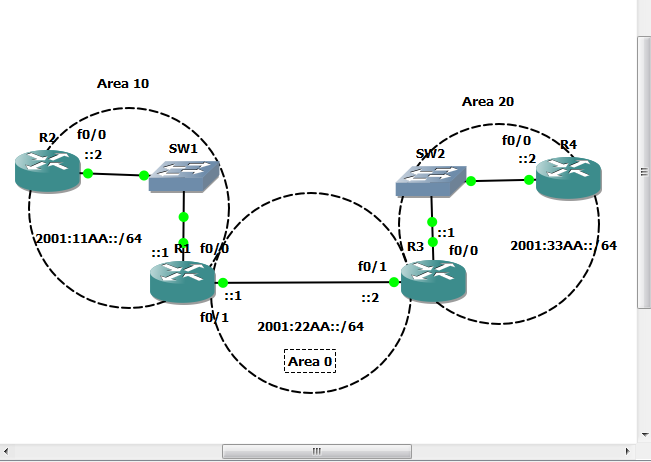
IPV6 - nuggets config


Not that anyone really needs this, but...

Router 1


interface FastEthernet0/0
 no ip address
 duplex auto
 speed auto
 ipv6 address 2001:11AA::1/64
 ipv6 ospf 1 area 10
!
interface FastEthernet0/1
 no ip address
 duplex auto
 speed auto
 ipv6 address 2001:22AA::1/64
 ipv6 ospf 1 area 0
!
interface FastEthernet1/0
 no ip address
 shutdown
 duplex auto
 speed auto
!
ip forward-protocol nd
!
!
ip http server
no ip http secure-server
!
ipv6 router ospf 1
 router-id 0.0.0.1
 log-adjacency-changes


Router 2


interface FastEthernet0/0
 no ip address
 duplex auto
 speed auto
 ipv6 address 2001:11AA::2/64
 ipv6 ospf 1 area 10
!
interface FastEthernet0/1
 no ip address
 shutdown
 duplex auto
 speed auto
!
interface FastEthernet1/0
 no ip address
 shutdown
 duplex auto
 speed auto
!
ip forward-protocol nd
!
!
ip http server
no ip http secure-server
!
ipv6 router ospf 1
 router-id 0.0.0.2
 log-adjacency-changes


Router 3


interface FastEthernet0/0
 no ip address
 duplex auto
 speed auto
 ipv6 address 2001:33AA::1/64
 ipv6 ospf 1 area 20
!
interface FastEthernet0/1
 no ip address
 duplex auto
 speed auto
 ipv6 address 2001:22AA::2/64
 ipv6 ospf 1 area 0
!
interface FastEthernet1/0
 no ip address
 shutdown
 duplex auto
 speed auto
!
interface FastEthernet2/0
 no ip address
 shutdown
 duplex auto
 speed auto
!
ip forward-protocol nd
!
!
ip http server
no ip http secure-server
!
ipv6 router ospf 1
 router-id 0.0.0.3
 log-adjacency-changes


Router 4


interface FastEthernet0/0
 no ip address
 duplex auto
 speed auto
 ipv6 address 2001:33AA::2/64
 ipv6 ospf 1 area 20
!
interface FastEthernet0/1
 no ip address
 shutdown
 duplex auto
 speed auto
!
interface FastEthernet1/0
 no ip address
 shutdown
 duplex auto
 speed auto
!
interface FastEthernet2/0
 no ip address
 shutdown
 duplex auto
 speed auto
!
ip forward-protocol nd
!
!
no ip http server
no ip http secure-server
!
ipv6 router ospf 1
 router-id 0.0.0.4
 log-adjacency-changes
!

Sunday, September 2, 2012

IPv6

Starting IPv6

When the CBT nuggets vids were made for the new CCNP, we still had IPv4 addresses.

April 2011, the last Asia area addresses were handed out. Europe will be next and ARIN in the US should be out in the next year or two.

Figure out IPv6. It's a necessity. More soon.

***lol, realized that the IOS I had attached to the hypervisor was not IPv6 capable.

***and the IOS I have that is IPv6 compatible does not like GNS3. Two routers immediately pegs both CPU cores.

Works - c2600-advipservicesk9-mz.124-17 two routers with IdlePC value set run at 10% CPU usage - 128mb recommended Ram

Does not - c2600-advipservicesk9-mz.124-15.T12

And Winner:

c3725-adventerprisek9-mz.124-15.T5.bin

GNS3 has issues with 2600 IOS software period.

my hypervisors kept crashing with c2600 124-17 too.


Friday, August 31, 2012

Policy Based Routing with IP SLA

To start this, a reminder that when using routers as simulated hosts, make sure you are turning ip routing OFF. And set a default gateway.

The client hosts are routers here:


Router 1


ip sla monitor 1
 type echo protocol ipIcmpEcho 200.1.1.2
 timeout 1000
 frequency 3
ip sla monitor schedule 1 life forever start-time now
!
!
!
track 1 rtr 1 reachability
!
!
interface Serial0/0
 ip address 200.1.1.1 255.255.255.0
 serial restart-delay 0
!
interface Serial0/1
 ip address 201.1.1.1 255.255.255.0
 serial restart-delay 0
!
interface Serial0/2
 no ip address
 shutdown
 serial restart-delay 0
!
interface Serial0/3
 no ip address
 shutdown
 serial restart-delay 0
!
interface FastEthernet1/0
 ip address 192.168.1.1 255.255.255.0
 ip policy route-map POLICY
 duplex auto
 speed auto
!
interface FastEthernet2/0
 no ip address
 shutdown
 duplex auto
 speed auto
!
ip local policy route-map ROUTER_TRAFFIC
no ip http server
!
!
!
!
ip access-list extended CLIENT1
 permit ip host 192.168.1.20 any
ip access-list extended CLIENT2
 permit tcp host 192.168.1.21 any eq telnet
 permit tcp host 192.168.1.21 any eq 443
ip access-list extended ROUTER
 permit ip any any
route-map POLICY permit 10
 match ip address CLIENT1
 set ip next-hop 201.1.1.2
!
route-map POLICY permit 20
 match ip address CLIENT2
 set ip next-hop 200.1.1.2
!
route-map POLICY permit 30
 set ip next-hop 201.1.1.2
!
route-map ROUTER_TRAFFIC permit 10
 match ip address ROUTER
 set ip next-hop verify-availability 200.1.1.2 10 track 1
 set ip next-hop 201.1.1.2

Router 2


interface Serial0/0
 ip address 200.1.1.2 255.255.255.0
 shutdown
 serial restart-delay 0


Router 3


interface Serial0/0
 ip address 201.1.1.2 255.255.255.0
 serial restart-delay 0

Router 4


no ip routing
!
!
no ip cef
no ip domain lookup
ip domain name lab.local
!
!
!
!
!
!


interface FastEthernet0/0
 ip address 192.168.1.20 255.255.255.0
 no ip route-cache
 duplex auto
 speed auto
!
interface FastEthernet1/0
 no ip address
 no ip route-cache
 shutdown
 duplex auto
 speed auto
!
ip default-gateway 192.168.1.1


Router 5


no ip routing
!
!
no ip cef
no ip domain lookup
ip domain name lab.local
!
!
!
!
!
!


interface FastEthernet0/0
 ip address 192.168.1.21 255.255.255.0
 no ip route-cache
 duplex auto
 speed auto
!
interface FastEthernet1/0
 no ip address
 no ip route-cache
 shutdown
 duplex auto
 speed auto
!
ip default-gateway 192.168.1.1

Tuesday, August 28, 2012

BGP tuning Lab 2


 Working on the Nuggets BGP Tuning vids, which you pretty much have to figure out the basic setup yourself.

I am not sure why I am not getting secondary routes on anything other than R1. I have to assume it is a setup issue with R1 as nothing on either side is getting the secondary routes, but it is.

***Worked thru this. It's a BGP concept that I had to get my head around of how BGP limits routes to only the best route is inserted in the routing table. Anyway, here are the configs.


Router 1

interface Serial0/0
 ip address 10.1.12.1 255.255.255.0
 serial restart-delay 0
 clock rate 201600
!
interface Serial0/1
 ip address 10.1.13.1 255.255.255.0
 serial restart-delay 0
 clock rate 201600
!
interface Serial0/2
 no ip address
 shutdown
 serial restart-delay 0
!
interface Serial0/3
 no ip address
 shutdown
 serial restart-delay 0
!
router bgp 5500
 no synchronization
 bgp log-neighbor-changes
 neighbor 10.1.12.2 remote-as 5500
 neighbor 10.1.13.2 remote-as 5500
 no auto-summary

Router 2


interface Serial0/0
 ip address 10.1.12.2 255.255.255.0
 serial restart-delay 0
 clock rate 201600
!
interface Serial0/1
 ip address 10.1.24.1 255.255.255.0
 serial restart-delay 0
 clock rate 201600
!
interface Serial0/2
 ip address 10.1.23.1 255.255.255.0
 serial restart-delay 0
!
interface Serial0/3
 no ip address
 shutdown
 serial restart-delay 0
!
router bgp 5500
 no synchronization
 bgp log-neighbor-changes
 neighbor 10.1.12.1 remote-as 5500
 neighbor 10.1.12.1 next-hop-self
 neighbor 10.1.23.2 remote-as 5500
 neighbor 10.1.24.2 remote-as 777
 no auto-summary

Router 3


interface Serial0/0
 ip address 10.1.13.2 255.255.255.0
 serial restart-delay 0
 clock rate 201600
!
interface Serial0/1
 ip address 10.1.36.1 255.255.255.0
 serial restart-delay 0
 clock rate 201600
!
interface Serial0/2
 ip address 10.1.23.2 255.255.255.0
 serial restart-delay 0
!
interface Serial0/3
 no ip address
 shutdown
 serial restart-delay 0
!
router bgp 5500
 no synchronization
 bgp log-neighbor-changes
 neighbor 10.1.13.1 remote-as 5500
 neighbor 10.1.13.1 next-hop-self
 neighbor 10.1.23.1 remote-as 5500
 neighbor 10.1.36.2 remote-as 777
 neighbor 10.1.36.2 route-map local_pref in
 default-metric 200
 no auto-summary
!
no ip http server
!
!
!
!
ip access-list standard routes_for_r2
 permit 200.0.0.0 0.255.255.255
ip access-list standard routes_for_r3
 permit 150.1.50.0 0.0.0.255
 permit 150.2.50.0 0.0.0.255
route-map local_pref permit 10
 match ip address routes_for_r3
 set local-preference 1000
!
route-map local_pref permit 20
 match ip address routes_for_r2
 set local-preference 10

Router 4


interface Serial0/0
 ip address 10.1.24.2 255.255.255.0
 serial restart-delay 0
!
interface Serial0/1
 ip address 10.1.45.1 255.255.255.0
 serial restart-delay 0
!
interface Serial0/2
 no ip address
 shutdown
 serial restart-delay 0
!
interface Serial0/3
 no ip address
 shutdown
 serial restart-delay 0
!
router bgp 777
 no synchronization
 bgp log-neighbor-changes
 neighbor 10.1.24.1 remote-as 5500
 neighbor 10.1.45.2 remote-as 911
 no auto-summary

Router 5


interface Loopback0
 ip address 150.1.50.1 255.255.255.0
!
interface Loopback1
 ip address 150.2.50.1 255.255.255.0
!
interface Serial0/0
 ip address 10.1.45.2 255.255.255.0
 serial restart-delay 0
 clock rate 201600
!
interface Serial0/1
 ip address 10.1.57.1 255.255.255.0
 serial restart-delay 0
 clock rate 201600
!
interface Serial0/2
 no ip address
 shutdown
 serial restart-delay 0
!
interface Serial0/3
 no ip address
 shutdown
 serial restart-delay 0
!
router bgp 911
 no synchronization
 bgp log-neighbor-changes
 network 150.1.50.0
 network 150.1.50.0 mask 255.255.255.0
 network 150.2.50.0
 network 150.2.50.0 mask 255.255.255.0
 redistribute connected route-map filter
 neighbor 10.1.45.1 remote-as 777
 neighbor 10.1.57.2 remote-as 711
 no auto-summary
!
no ip http server
!
!
!
access-list 50 permit 150.1.50.0
access-list 50 permit 150.2.50.0
route-map filter permit 10
 match ip address 50

Router 6


interface Serial0/0
 ip address 10.1.36.2 255.255.255.0
 serial restart-delay 0
 clock rate 201600
!
interface Serial0/1
 ip address 10.1.67.1 255.255.255.0
 serial restart-delay 0
 clock rate 201600
!
interface Serial0/2
 no ip address
 shutdown
 serial restart-delay 0
!
interface Serial0/3
 no ip address
 shutdown
 serial restart-delay 0
!
router bgp 777
 no synchronization
 bgp log-neighbor-changes
 neighbor 10.1.36.1 remote-as 5500
 neighbor 10.1.67.2 remote-as 711
 no auto-summary

Router 7


interface Loopback0
 ip address 200.50.2.1 255.255.255.0
!
interface Loopback1
 ip address 200.60.2.1 255.255.255.0
!
interface Serial0/0
 ip address 10.1.57.2 255.255.255.0
 serial restart-delay 0
 clock rate 201600
!
interface Serial0/1
 ip address 10.1.67.2 255.255.255.0
 serial restart-delay 0
 clock rate 201600
!
interface Serial0/2
 no ip address
 shutdown
 serial restart-delay 0
!
interface Serial0/3
 no ip address
 shutdown
 serial restart-delay 0
!
router bgp 711
 no synchronization
 bgp log-neighbor-changes
 network 200.50.2.0
 network 200.60.2.0
 neighbor 10.1.57.1 remote-as 911
 neighbor 10.1.67.1 remote-as 777
 no auto-summary